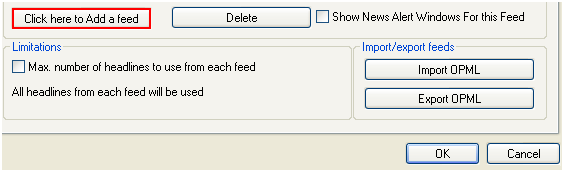
In order to add a new feed, click on “Click here to Add a feed” button inside the “Feeds” screen.
Figure 38: Adding a new feed (step 1/4)
The following screen will be displayed.
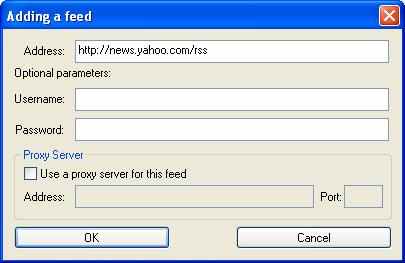
Figure 39: Adding a new feed (step 2/4)
The following parameters are available inside this screen:
Address – input field for entering the address the feed will be retrieved from
Optional parameters (user name, password) – input fields for entering user name and password (note: some feeds require authentication prior to being able to use them - e.g. corporate intranets)
Proxy Server – if the feed requires the use of the proxy server, select the “Use a proxy server for this feed” checkbox and define the proxy server address and port
After setting the desired parameters, click on the “OK” button and the following screen will be displayed.
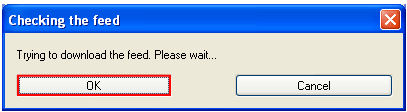
Figure 40: Adding a new feed (step 3/4)
The “EasyByte News Ticker” will attempt to download the feed and the following screen containing the feed title will be displayed.
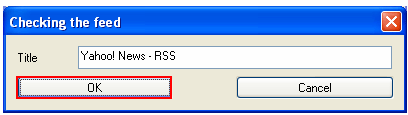
Figure 41: Adding a new feed (step 4/4)
Click on the “OK” button to confirm adding of this feed and it will be added to the list.
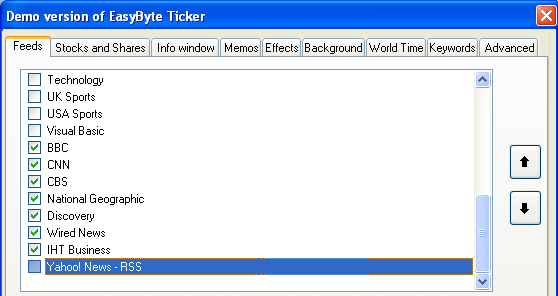
Figure 42: New feed added