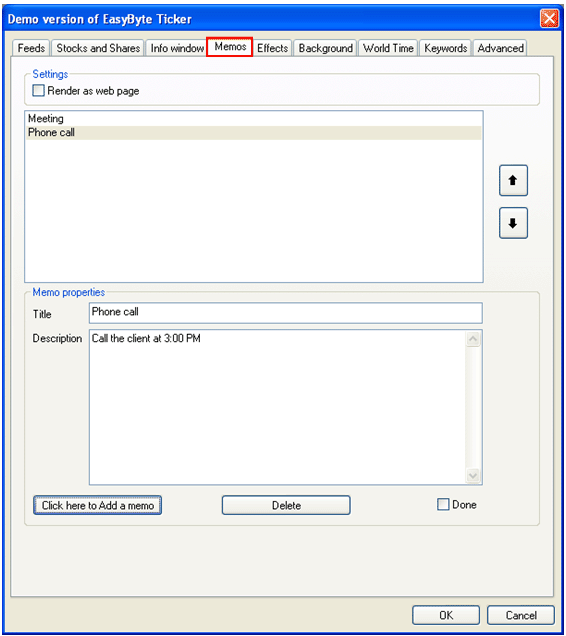
The “Memos” feature is used a s a reminder for your daily tasks, errands or activities. When you add a new memo it is displayed within the headlines menu (see section Using the Headlines Menu) as well as within the ticker main window with all other news items.
In order to start managing memos, choose “Options” from the main menu (see Figure 35) and then select “Memos”.
Figure 60: Managing Memos
The following options are available inside this screen:
Render as web page – select this checkbox if you wish to render the memo as a web page
Click here to Add a memo – option for adding a new memo (see section Adding a new memo)
Delete – option for deleting a demo (see section Deleting a symbol)
Done – option for marking the memo as done in which case it will not be displayed within the main ticker window or headlines menu anymore (see section Marking a memo as done)
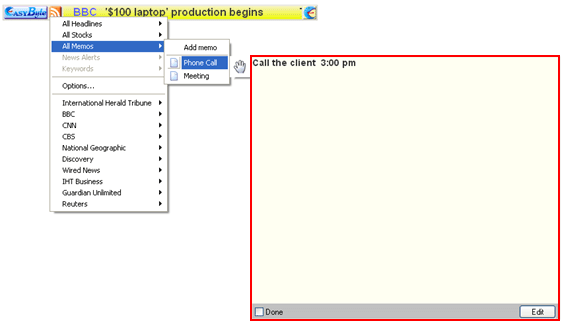
Figure 61: Example of the memo rendered as a web page