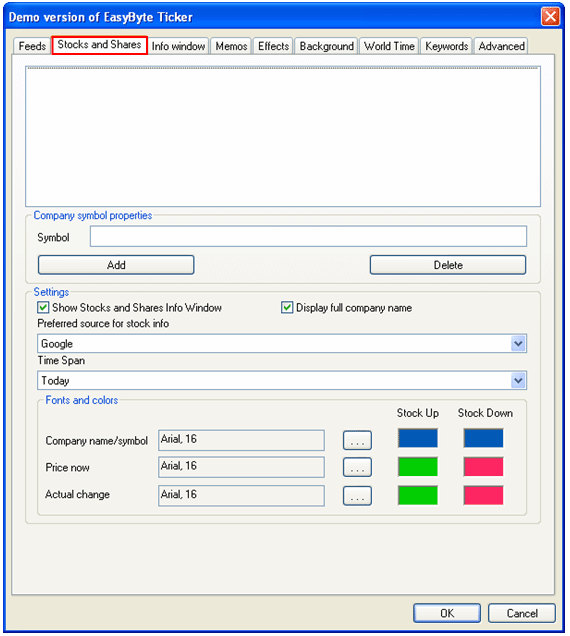
In order to start managing stock and shares, choose “Options” from the main menu (see Figure 35).
Figure 50: Managing stock and shares
The following parameters are available inside this screen:
Company symbol properties
Symbol – input field for entering the stock symbol while creating a new stock item (see section Adding a new symbol)
Add – option for adding a symbol (see section Adding a new symbol)
Delete – option for deleting a symbol (see section Deleting a symbol)
Settings
Show Stocks and Shares Info Window – select this checkbox if you wish to display stocks and shares info window
Display full company name – select this checkbox if you wish to display full name of the company
Preferred source for stock info – pull down menu for choosing the preferred source for stock information:
Yahoo
Time Span – pull down menu for choosing the desired time span for displaying stock information
Today
1 Week
1 Month
3 Months
6 Months
1 Year
Fonts and colors – options for choosing the desired font size and colors for the following information:
Company name/symbol
Price now
Actual change
Stock Up – choose the color for displaying information in case the stock is up
Stock Down – choose the color for displaying information in case the stock is down