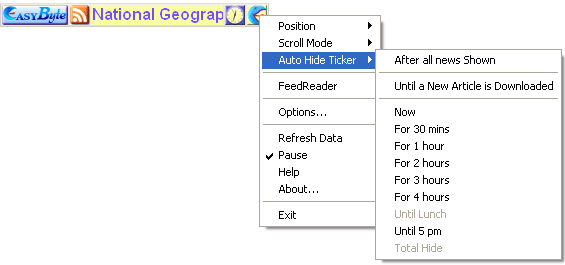
In order to set the desired auto hide option for the “EasyByte News Ticker”, choose one of the options inside the “Auto Hide Ticker” menu.
Figure 32: Setting Ticker Auto Hide Options
The following options are available inside the menu:
After all news Shown – choose this option if you want to hide the ticker once all news items have been shown
Until A New Article is Downloaded – choose this option if you want to hide the ticker until a new article is downloaded
Now – choose this option to hide the ticker immediately
For 30 mins – choose this option to hide the ticker for 30 minutes
For 1 hour – choose this option to hide the ticker for 1 hour
For 2 hours – choose this option to hide the ticker for 2 hours
For 3 hours – choose this option to hide the ticker for 3 hours
For 4 hours – choose this option to hide the ticker for 4 hours
Until Lunch – choose this option to hide the ticker until lunch (note: choose this option in order to hide the ticker until 1 pm; this option will only be enabled until 1 pm)
Until 5 pm – choose this option to hide the ticker until 5 pm
Total hide – choose this option to completely hide the Ticker