 inside the main ticker window.
In order to start using the headlines menu, click on this icon inside the main ticker window.
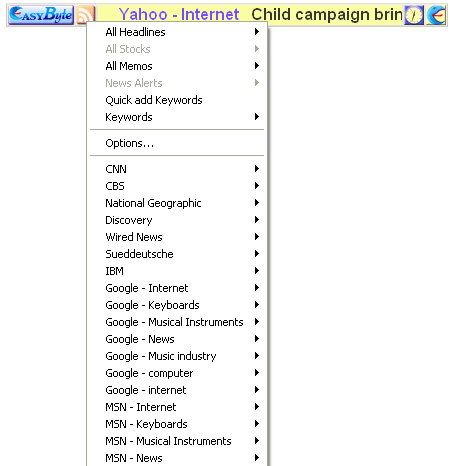
Figure 7: Using the RSS feed menu
The following options are available inside this menu:
All Headlines – click on this option to display the sub menu with all headlines; you can click on any of them to load the news item inside your default browser
All Stocks – click on this option to display all defined stock information (see section Managing Stock and Shares)
All Memos – click on this option to display all defined memos (see section Managing Memos)
News Alerts - click on this option to display all defined news alerts
Quick and keywords – click on this option to quick keywords screen and define desired keywords (see section Using option Quick and Keywords)
Keywords - click on this option to display all defined memos (see section Managing the Keywords)
Options – choose this option to start managing various “EasyByte News Ticker” settings (see section Managing Ticker Options)
BBC – click on this option to open a sub menu containing news items from BBC
CNN - – click on this option to open a sub menu containing news items from CNN
CBS – click on this option to open a sub menu containing news items from CBS
National Geographic – click on this option to open a sub menu containing news items from National Geographic
Discovery – click on this option to open a sub menu containing news items from Discovery