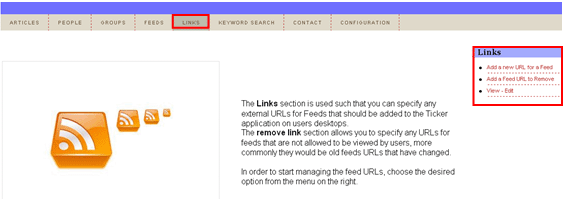
The purpose of the “Links” section is to allow you to specify any external URLs for Feeds that should be added to the Ticker application on users desktops. The remove link section allows you to specify any URLs for feeds that are not allowed to be viewed by users, more commonly they would be old feeds URLs that have changed. In order to start managing the feed URLs, choose the desired option from the menu on the right.
Figure 51: Options within the "Links" section
The following options are available inside this screen:
Add a new URL for a feed – option for adding a new URL for a feed (see section Adding a new URL to a feed)
Add a Feed URL to remove – option for removing an URL from a feed (sees section Removing an URL from a feed)
View - edit – option for editing a desired URL (see section Editing an URL feed)